List an Item
Add a new item to the ThredUp catalog in just a few steps. This guide gets you up and running quickly with a working example.
Prepare the Payload
Create the list-item-request.json file with the payload for the new item:
list-item-request.json
{
  "title": "Test title",
  "description": "Test description",
  "price": 30000,
  "msrp": 32000,
  "photos": [
    {
      "url": "https://tup-images.thredtest.com/assets/1500016556/retina.jpg",
      "subtype": "front"
    },
    {
      "url": "https://tup-images.thredtest.com/assets/1500016558/retina.jpg",
      "subtype": "back"
    },
    {
      "url": "https://tup-images.thredtest.com/assets/1500016557/retina.jpg",
      "subtype": "side"
    }
  ],
  "brand_id": 75,
  "category_id": 980,
  "authentication_type": "SELLER",
  "quality": "Q2",
  "condition_description": "creasing, wear and scuffs on exterior, minor wear in interior, scratches on hardware",
  "with_tag": false,
  "warehouse_id": 9999,
  "size": {
    "scale": "Fits All",
    "name": "One Size"
  },
  "attributes": {
    "color": [
      "Brown",
      "Gold"
    ],
    "accent": [
      "Chains",
      "Beaded",
      "Glitter"
    ],
    "measurements": {
      "width": 1.23,
      "height": 3.45,
      "depth": 6.78,
      "drop_length": 9.10,
      "inseam": 15,
      "shorts_inseam": 5,
      "heel_height": 0.5,
      "shoe_width": "AAA",
      "chest": 5.5,
      "center_back_length": 10.75,
      "skirt_length": 50.23,
      "dress_length": 34.53,
      "rise": 10,
      "waist": 15.55
    }
  }
}
Submit the Request
Use the following command to list your first item:
cURL Command
curl -X POST https://dropshipping.thredtest.com/api/v1.0/items \
  -H "Content-Type: application/json" \
  -H "X-Thredup-Access-Token: YOUR_ACCESS_TOKEN" \
  -d @list-item-request.json
Review the Response
When successful, you'll receive the new item's unique identifier:
Success Response (201 Created)
{
  "item_number": "1500003295"
}
Verify the Listing
Note
The item is listed asynchronously, so it may take some time before it transitions to the listed state.
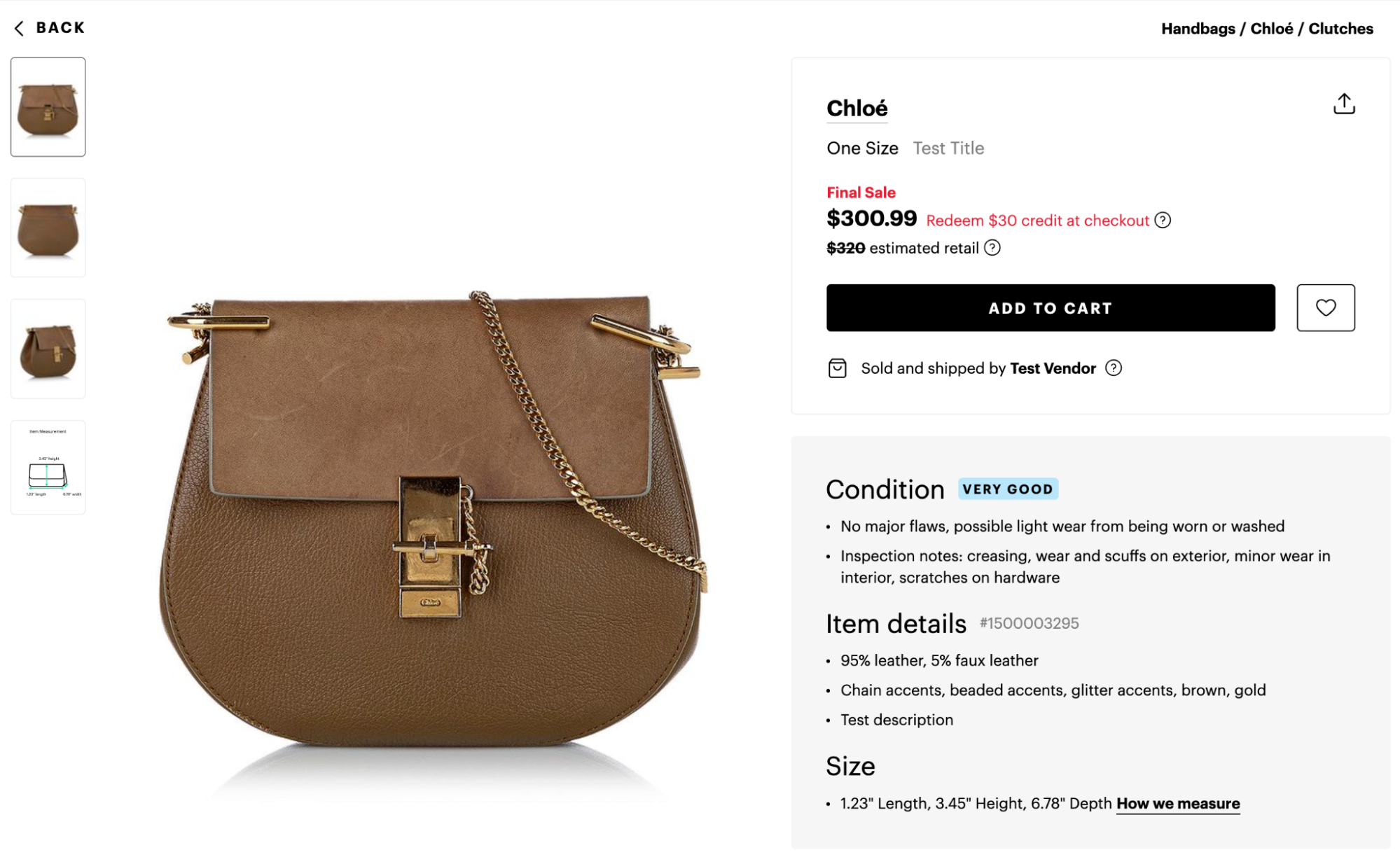
Once the item is successfully listed, it will become visible to customers: